Flawless Town Halls: A Guide to Stress-Free Live Streaming for Enterprises and Municipalities
You just spent hours setting up your corporate town hall streaming, only to face choppy video and lost connections. When your message reaches hundreds or thousands, glitches aren’t just frustrating—they erode trust. This guide breaks down how to run a smooth municipal live streaming or public meeting broadcast with reliable webinar AV setup and smart enterprise streaming solutions. Keep reading to learn how to make your next large conference room AV event stress-free and flawless.
Understanding Your Streaming Needs
Before you jump into technical specs, let’s talk about what you’re actually trying to accomplish. A corporate town hall streaming event isn’t the same as a casual video call. You’re broadcasting to a large audience, often with executives or elected officials presenting critical information. The stakes are high, and your setup needs to match that reality.
Think about your typical scenario. Maybe you’re a corporate communications director planning a quarterly update with your CEO. Or perhaps you’re a city manager preparing for a public meeting broadcast that residents will watch from home. Each situation has unique requirements, but they all share one thing: you need reliability above everything else.
Assessing Your Audience Size and Location
Start by counting heads. Are you streaming to 50 people or 5,000? This number shapes every decision you’ll make about your enterprise streaming solutions. A smaller audience might work fine with basic platforms, while larger groups need industrial-grade infrastructure.
Location matters too. If your viewers are all on the same corporate network, you have different considerations than a municipal live streaming event where citizens tune in from home internet connections. Map out where people will watch from, and you’ll spot potential problems before they happen.
Building Your Technical Foundation
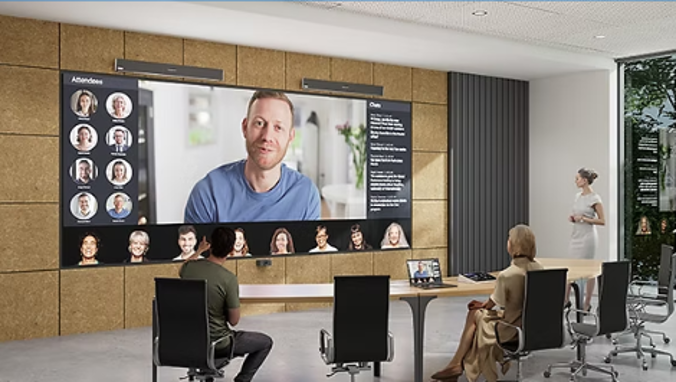
Now let’s get practical about equipment and infrastructure. Your webinar AV setup is only as strong as its weakest link, so we’ll build from the ground up.
Internet Connection: Your Lifeline
Your internet connection is everything. I’ve seen beautiful large conference room AV setups fail because someone assumed the office WiFi would handle the load. Don’t make that mistake.
You need a dedicated, wired connection with upload speeds that match your streaming quality. For HD streaming, aim for at least 10 Mbps upload speed, but give yourself breathing room. Test your connection at the same time of day you’ll be streaming, because network traffic varies.
Get a backup connection too. This could be a secondary internet line or even a mobile hotspot as an emergency fallback. When you’re running a public meeting broadcast, having plan B ready saves the day.
Camera and Audio Equipment
Good video catches the eye, but bad audio kills engagement. People will tolerate imperfect video quality, but they’ll leave the moment they can’t hear clearly.
For your corporate town hall streaming setup, invest in quality microphones first. Lapel mics work great for speakers who move around. Boundary mics cover conference tables. Handheld mics give you flexibility for Q&A sessions. Whatever you choose, test it thoroughly in your actual space.
Cameras come next. You don’t need Hollywood production gear, but skip the built-in laptop camera. A good PTZ (pan-tilt-zoom) camera gives you professional framing and the ability to adjust shots remotely. For larger venues, consider multiple camera angles to keep things visually interesting.
Lighting Makes the Difference
Lighting transforms amateur setups into professional broadcasts. Natural light through windows looks great until clouds roll in and your CEO disappears into shadow. Control your lighting environment.
Basic three-point lighting works wonders. Place a key light in front of your speaker, a fill light to soften shadows, and a backlight to separate them from the background. LED panels are affordable and adjustable. Position them before your speakers arrive, then make small tweaks during rehearsal.
Choosing the Right Streaming Platform
Your platform choice affects everything from viewer experience to your stress levels on event day. Let’s break down what matters.
Platform Features That Matter
Look for platforms built for enterprise streaming solutions, not consumer video apps. You need features like:
Scalability: Can the platform handle your maximum expected audience plus 20% more? Growth happens, and viral internal videos are real.
Reliability: Check uptime guarantees and read reviews from organizations like yours. A platform that works for small webinars might crumble under the load of a full corporate town hall streaming event.
Interactive Tools: Q&A features, polls, and chat keep audiences engaged. Passive viewing leads to people checking out mentally or literally closing the window.
Analytics: You want to know who watched, for how long, and which segments got replayed. This data shapes future events and proves ROI to leadership.
Testing Your Platform
Never, ever go live on a platform you haven’t tested. Run a full rehearsal at least 48 hours before your actual event. This gives you time to fix problems without panic.
During your test, check every feature you plan to use. Can moderators mute disruptive participants? Do polls display correctly? Does screen sharing work smoothly? Test from different devices and browsers, because your audience won’t all be using the same setup.
Setting Up Your Physical Space
Your large conference room AV setup needs thoughtful preparation. Walk through the space with fresh eyes and imagine you’re a remote viewer watching on a laptop.
Room Acoustics
Hard surfaces bounce sound around, creating echoes that make speakers hard to understand. Carpets, curtains, and acoustic panels absorb sound and clean up your audio. If you’re stuck with a echo-prone room, strategic furniture placement helps. Bookshelves, upholstered chairs, and even plants dampen reflections.
Check for ambient noise too. HVAC systems, humming lights, and nearby traffic all creep into your audio. Record a test clip and listen with headphones. You’ll hear problems your ears normally filter out.
Background and Framing
Your background communicates as much as your content. A messy bookshelf or blank wall both send messages. Choose something professional but not distracting. Company branding works well if it’s subtle. Avoid busy patterns that create visual noise or shimmer on camera.
Frame your speakers properly. Leave headroom above their heads but don’t make them look tiny in the frame. The rule of thirds applies here: position faces along the upper third line of the frame for natural, professional composition.
Creating Your Streaming Workflow
A clear workflow prevents chaos when you’re live. Let’s map out the process from start to finish.
Pre-Event Checklist
Build a detailed checklist and follow it every single time. Include items like:
-
Test all equipment 24 hours before the event
-
Verify internet connection speeds
-
Confirm platform access for all team members
-
Load presentation materials and test screen sharing
-
Set up backup systems
-
Brief speakers on looking at cameras and using microphones
-
Prepare contingency plans for common problems
Your checklist becomes your safety net. When stress hits during a public meeting broadcast, you can fall back on your process instead of making panicked decisions.
Team Roles and Communication
Don’t try to run a corporate town hall streaming event solo. Assign clear roles:
Producer: Manages the overall event flow and makes executive decisions.
Technical Director: Handles the streaming platform, camera switching, and technical troubleshooting.
Audio Engineer: Monitors sound levels and adjusts microphones.
Moderator: Manages chat, filters questions, and keeps audience engagement healthy.
Set up a private communication channel for your team. Headsets with private audio let you coordinate without the audience hearing. Establish clear signals for common situations: mute requests, camera changes, or technical holds.
Managing the Live Event
You’ve prepared thoroughly. Now it’s showtime. Stay calm and trust your preparation.
Starting Strong
Begin your stream 5-10 minutes early with a holding screen that confirms people are in the right place. Display the event title, start time, and maybe some light background music. This reassures early arrivals and gives latecomers a chance to join.
When you go live, start with a brief technical check. Ask viewers to confirm they can see and hear clearly. This interactive moment catches problems immediately and builds audience engagement.
Monitoring Multiple Factors
Your eyes need to be everywhere during a webinar AV setup event. Watch your streaming platform’s health dashboard for bandwidth issues. Monitor the audience chat for questions or technical problems. Keep an eye on your speakers to anticipate when they’ll need support.
Set up multiple monitors if possible. One shows what your audience sees, another displays your production controls, and a third tracks chat and analytics. This setup prevents you from missing critical information.
Handling Problems Gracefully
Problems will happen. Accept this truth and prepare responses. If audio cuts out, have a slide ready that says “Experiencing technical difficulties, we’ll be back in a moment.” If a speaker’s connection drops, have backup content ready to fill time.
Communicate clearly when issues arise. Your audience appreciates transparency. A simple “We’re experiencing audio issues and working to fix them” beats dead air and confusion.
Engaging Your Remote Audience
Keeping people engaged through screens takes intention. Passive viewers become distracted viewers fast.
Interactive Elements
Build interaction into your municipal live streaming events from the start. Open with a poll that relates to your content. This gets people clicking and invested. Scatter questions throughout your presentation, not just at the end.
Use Q&A strategically. Have someone monitoring questions in real time, grouping similar ones, and feeding the best to your speakers. This creates dialogue instead of monologue.
Visual Variety
Talking heads get boring fast. Mix up your visuals every few minutes. Switch between cameras if you have multiple angles. Cut to slides for data-heavy sections. Show relevant graphics or videos. Even simple lower-third graphics with speaker names and titles add polish.
For longer corporate town hall streaming events, consider breaking into segments with different presenters or formats. A 60-minute single-speaker presentation exhausts attention spans. Three 20-minute segments with different voices and styles keeps energy high.
Post-Event Follow-Up
Your work isn’t done when the stream ends. Smart follow-up extends your event’s value and prepares you for next time.
Recording and Distribution
Always record your enterprise streaming solutions events. Make the recording available within 24 hours while interest is still high. Edit out dead air, technical glitches, or long pauses if possible, but don’t delay distribution for perfect editing.
Create short highlight clips for social media or internal communications. A 90-second recap reaches people who missed the live event and might draw them to watch the full recording.
Gathering Feedback
Send a brief survey while the event is fresh in people’s minds. Ask specific questions:
-
Could you see and hear clearly?
-
Was the content relevant to you?
-
What would improve future events?
-
What technical issues did you encounter?
This feedback shapes your next public meeting broadcast. Track common themes and address them in your preparation.
Technical Debrief
Meet with your team within a day or two of the event. Review what worked and what didn’t. Update your checklists based on lessons learned. Document solutions to problems you encountered so you’re ready if they happen again.
Scaling Your Streaming Program
Once you’ve mastered the basics, you can grow your streaming capabilities to match organizational needs.
Building Consistency
Consistency builds audience trust and makes your job easier. Develop templates for common event types. Create standard graphics, intro sequences, and layouts. When viewers know what to expect, they’re more comfortable and engaged.
Document your processes thoroughly. If you’re the only person who knows how to run your large conference room AV setup, you’re a bottleneck and a single point of failure. Train backup team members so knowledge spreads.
Investing in Growth
As your program matures, strategic investments pay off. Better cameras, professional lighting, and upgraded streaming platforms improve quality noticeably. Dedicated streaming hardware like encoders provides reliability that software solutions can’t match.
Consider permanent installations for frequently used spaces. Ceiling-mounted cameras, installed microphones, and rack-mounted equipment eliminate setup time and ensure consistency.
Common Pitfalls to Avoid
Learn from others’ mistakes so you don’t repeat them.
Underestimating Bandwidth
This kills more streams than any other single factor. Test your upload speeds, not just download. Confirm your network can handle the sustained load. Remember that other office activities compete for bandwidth during business hours.
Skipping Rehearsals
“We’ll figure it out as we go” is a recipe for disaster. Every minute spent rehearsing saves ten minutes of stress during the live event. Run through the entire program, including transitions, screen shares, and Q&A.
Ignoring Audio Quality
Crystal-clear video with muddy audio frustrates viewers more than modest video with perfect sound. Prioritize audio in your webinar AV setup budget and attention.
Forgetting Accessibility
Captions benefit everyone, not just those with hearing impairments. They help people in noisy environments, non-native speakers, and anyone who needs to watch with sound off. Many platforms offer real-time automated captions. Use them.
Building Confidence Through Preparation
Running flawless corporate town hall streaming events comes down to preparation, practice, and process. You don’t need the fanciest equipment or the biggest budget. You need reliable gear, thorough testing, and a team that knows their roles.
Start small if you’re new to municipal live streaming. Run internal test events before going public. Build your skills and confidence gradually. Each successful event teaches you something and prepares you for the next one.
Remember that perfection isn’t the goal. Connection is the goal. A technically flawless broadcast with boring content fails. A slightly imperfect stream with compelling content and good engagement succeeds.
Taking Your Next Steps
You now have a framework for stress-free enterprise streaming solutions. The next move is yours. Start by auditing your current setup against the guidelines here. Identify your biggest gaps and prioritize fixing them.
If you’re planning a large conference room AV event soon, begin your preparation now. Build your checklist, test your equipment, and rehearse with your team. The investment of time upfront pays dividends in reduced stress and better outcomes.
For organizations just starting with public meeting broadcast capabilities, don’t let the scope overwhelm you. Focus on the fundamentals: reliable internet, good audio, clear video, and thorough testing. You can always add sophistication later.
The tools and techniques for professional streaming are more accessible than ever. You don’t need a broadcast studio to deliver broadcast quality. You need knowledge, preparation, and attention to detail. This guide gives you the knowledge. The rest is up to you.
Ready to make your next streaming event your best one yet? Take these practices, adapt them to your specific situation, and start building your confidence through preparation and practice. Your audience deserves your best effort, and you deserve the peace of mind that comes from knowing you’re ready for anything.
Frequently Asked Questions
What equipment do I need for a basic corporate town hall streaming setup?
You need three core components: a quality microphone (lapel or boundary style), a decent camera (PTZ cameras work well), and a reliable wired internet connection with at least 10 Mbps upload speed. Add basic lighting to improve video quality, and choose a streaming platform designed for enterprise use. Start with these essentials and add sophistication as your program grows.
How can I ensure my municipal live streaming meets legal compliance requirements?
Check your state and local regulations for public meeting broadcasts, as requirements vary by jurisdiction. Many areas require live streaming and archiving capabilities for transparency. Choose a streaming platform that offers automatic recording and archiving features, and verify it meets your specific compliance needs before going live.
What’s the most common cause of streaming failures during live events?
Insufficient internet bandwidth causes more failures than any other factor. Many organizations test download speeds but forget to check upload capacity, which matters most for streaming. Always test your connection at the time of day you’ll be streaming, use a wired connection instead of WiFi, and have a backup internet source ready in case your primary connection fails.
How far in advance should I start preparing for a large conference room AV event?
Begin preparation at least two weeks before your event for complex setups. This gives you time to test equipment, run full rehearsals, identify problems, and fix them without panic. Schedule your final dress rehearsal 48 hours before going live so you have time to address any last-minute issues that surface.
What should I do if technical problems occur during a live stream?
Stay calm and communicate clearly with your audience. Have a “technical difficulties” slide ready to display while you troubleshoot. If the problem takes more than 60 seconds to fix, acknowledge it verbally and give viewers an estimate of when you’ll resume. Always have backup equipment and a contingency plan ready so you can switch quickly if primary systems fail.
