How AI and Live Telemetry Are Fixing Your Meeting Rooms Before You Even Notice
You spend hours chasing down meeting room issues that vanish before you find the root cause. AI-driven AV support changes that by spotting problems through conference room telemetry before anyone notices. With remote AV monitoring and automated meeting room alerts, you get proactive IT support that keeps AV system health steady without adding to your workload.
The Real Cost of Reactive AV Management
Let's be honest. Your meeting rooms are causing headaches. The executive team needs to present to the board in 10 minutes, and suddenly the display won't connect. The sales team's client demo just failed because the camera froze. Your phone rings off the hook with tickets about audio that cuts out randomly.
You're stuck playing whack-a-mole with AV problems. By the time you arrive at the room, everything works fine. You can't reproduce the issue. The user shrugs and says "it was broken a minute ago." You leave feeling like you wasted 30 minutes, and the problem will probably come back tomorrow.
This reactive approach drains your team's time and energy. Every support ticket pulls someone away from strategic projects. Every false alarm erodes trust between IT and end users. Every mysterious glitch that fixes itself stays in your backlog as an unsolved mystery.
The numbers tell the story. Organizations lose an average of 37 minutes per week per meeting room to technical difficulties. Multiply that across all your conference spaces and all your employees. That's thousands of hours and potentially millions in lost productivity each year.
What AI-Driven AV Support Actually Means
AI-driven AV support isn't about robots taking over your job. It's about giving you superpowers to see problems before they impact users. Think of it as having a tireless assistant who watches every meeting room 24/7 and taps you on the shoulder only when something needs attention.
Here's how it works in practice. Sensors and software continuously collect data from your AV equipment. We're talking about things like CPU temperature, network bandwidth, audio levels, camera frame rates, and connection stability. This conference room telemetry flows into an AI system that learns what "normal" looks like for each room.
The AI doesn't just collect numbers. It understands patterns. It knows that Conference Room B always has higher CPU usage on Monday mornings because the marketing team runs video-heavy presentations. It recognizes that a slight audio drift at 2 AM is normal building HVAC noise, but the same drift at 2 PM means a microphone is failing.
When the AI spots something unusual, it doesn't panic. It evaluates severity, checks historical data, and decides whether this needs immediate attention or can wait. You get automated meeting room alerts that actually matter, not a flood of false positives that train you to ignore notifications.
Remote AV Monitoring That Works While You Sleep
Remote AV monitoring means you don't need to physically visit every room to know what's happening. Your dashboard shows real-time status across all your meeting spaces. Green means everything's healthy. Yellow means something's trending in the wrong direction. Red means action is needed now.
Let's walk through a real scenario. It's Friday at 6 PM. Everyone's gone home for the weekend. Your remote AV monitoring system notices that the HDMI input on the main display in the executive boardroom is starting to show signal degradation. The issue isn't bad enough to fail yet, but the trend line points to problems by Monday morning.
The system sends you an alert with the details. You log in remotely, check the diagnostics, and see that a firmware update might help. You push the update remotely while sipping your coffee at home. Monday morning, the executive team walks into a perfectly functioning room. They never knew there was almost a problem.
That's the beauty of proactive IT support. You fix things before they break. Users see you as the IT team that keeps everything running smoothly, not the firefighters who show up after disaster strikes.
Conference Room Telemetry: Your Crystal Ball
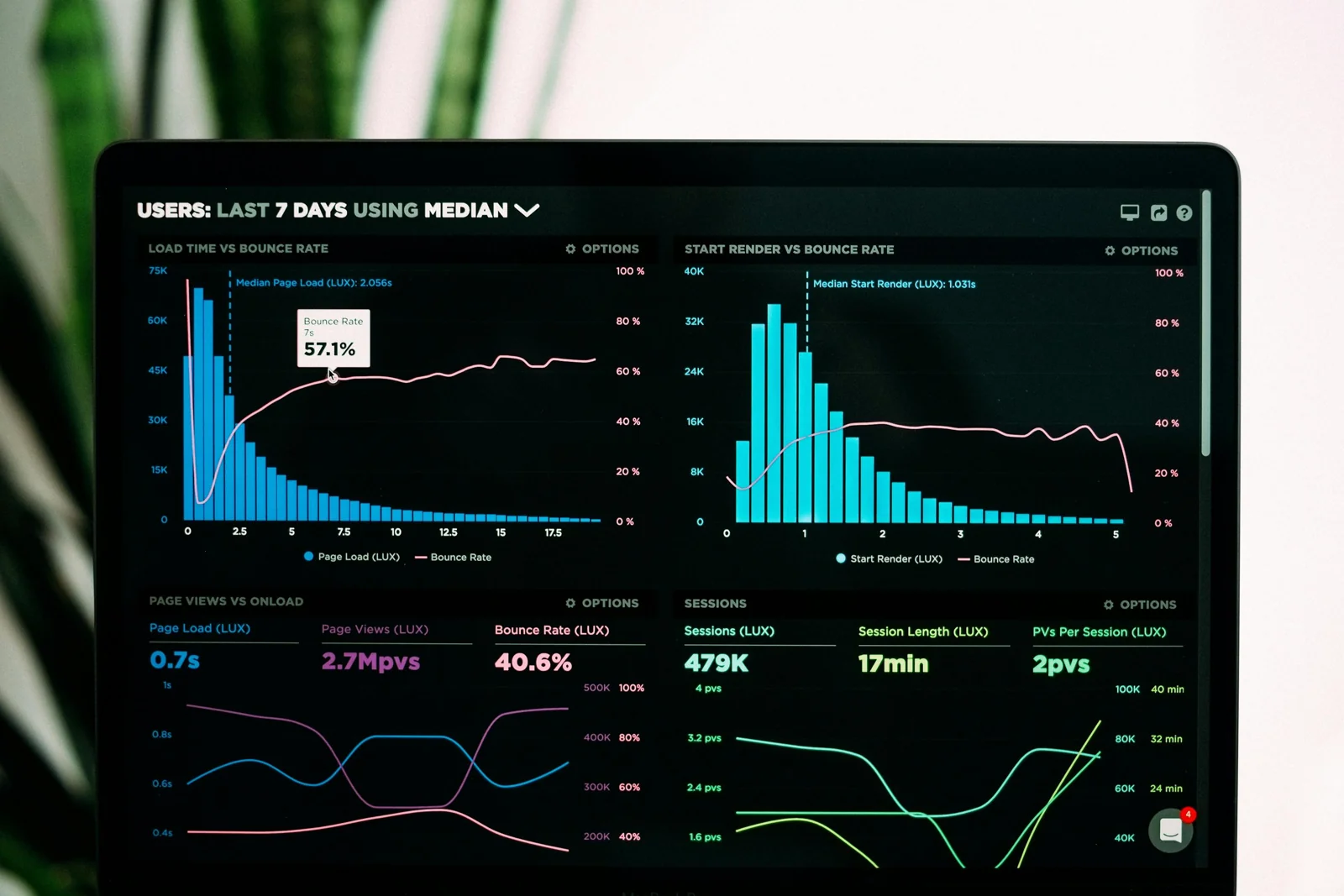
Conference room telemetry gives you data you never had before. You can see exactly what happened in any room at any time. When someone says "the audio was terrible during our 2 PM call," you don't have to guess. You pull up the telemetry and see that network packet loss spiked at 2:17 PM for exactly four minutes.
Now you have facts. You can check what else happened on your network at that time. Maybe someone started a massive file transfer. Maybe there was a brief internet service provider hiccup. You can correlate the AV issue with other systems and find the real root cause.
This data helps you spot trends you'd never notice otherwise. You might find that one particular model of camera crashes every 72 hours and needs a reboot. Or that rooms on the west side of the building have audio issues every sunny afternoon when the sun heats up certain cables. These patterns are invisible without systematic data collection.
Your conference room telemetry also helps you plan better. You can see which rooms get heavy use and which sit empty. You can track whether your AV investments are paying off. You can justify budget requests with hard data about system performance and user satisfaction.
Automated Meeting Room Alerts That Cut Through the Noise
Not all alerts are created equal. The old way of monitoring sends you an email every time any metric crosses a threshold. Your inbox fills up with notifications. You learn to ignore them. When a real crisis happens, you miss it in the noise.
Automated meeting room alerts powered by AI work differently. The system understands context. It knows that a camera going offline at 3 AM in an unused room is low priority. The same camera failing at 8:55 AM right before a scheduled meeting is urgent.
The alerts come with actionable information. Instead of "Camera 3 offline," you get "Main camera in Conference Room 5A has lost network connection. Meeting scheduled in 15 minutes. Suggested action: Reboot camera via remote management or dispatch technician."
You can set up escalation rules that match your team's workflow. Minor issues create tickets in your system but don't page anyone. Medium issues notify the on-call technician. Critical issues that could impact C-level meetings go straight to your phone with all the context you need to respond fast.
Maintaining AV System Health Without Extra Staff
Your team is already stretched thin. You can't hire five more people just to babysit meeting rooms. AI-driven AV support gives you force multiplication. One person can effectively monitor and maintain dozens or even hundreds of rooms.
AV system health becomes something you manage by exception. Instead of scheduled rounds where you check every room every week, you focus your time where it's needed. The AI handles the routine monitoring. You handle the problems that actually require human intelligence and hands-on work.
This approach also helps you extend the life of your equipment. By catching small issues early, you prevent them from cascading into big failures. A cable that's starting to fray gets replaced during regular maintenance, not during an emergency service call that costs three times as much.
You can also optimize your maintenance windows. The system tells you which rooms need attention and what parts to bring. You make one trip with the right tools instead of three trips because you didn't know what was wrong.
Real-World Results from Proactive IT Support
Organizations that switch to proactive IT support see measurable improvements fast. Support tickets related to meeting rooms typically drop by 40-60% within the first quarter. That's not because there are fewer problems. It's because you're fixing them before users notice.
Mean time to resolution improves dramatically. When an issue does surface, you already have diagnostic data. You know what's wrong before you walk into the room. You bring the right replacement part or push the right configuration change. Problems that used to take hours get solved in minutes.
User satisfaction scores go up. People stop complaining about unreliable conference rooms. They start trusting that when they book a space, it will work. That trust reduces anxiety and lets people focus on their actual work instead of worrying about technology.
Your team's morale improves too. Instead of running around putting out fires, your technicians work on interesting projects. They learn new skills managing AI systems and analyzing data. They feel like professionals solving problems, not janitors cleaning up messes.
Getting Started with AI-Driven AV Support
You don't need to rip out all your existing equipment and start over. Modern AI-driven AV support systems work with most major brands of conference room technology. The key is choosing a platform that can ingest data from your current setup.
Start with a pilot program. Pick your most problematic meeting rooms or your most important spaces. Install remote AV monitoring on those rooms and run it for 30 days. You'll quickly see the value when you catch issues before they impact meetings.
During the pilot, pay attention to the alert quality. Are you getting useful notifications or spam? Good AI systems learn from your feedback. When you mark an alert as not helpful, the system adjusts. Over time, the signal-to-noise ratio gets better and better.
Train your team on the new tools. Show them how to read the dashboard, interpret telemetry data, and respond to automated meeting room alerts. Make sure everyone understands that this technology supports them, not replaces them. The AI handles the boring, repetitive monitoring. Humans handle the creative problem-solving.
Building Your Business Case
When you pitch AI-driven AV support to leadership, focus on outcomes they care about. Calculate the current cost of meeting room downtime in terms of employee hours wasted. Show how proactive IT support reduces that waste.
Point out the impact on employee experience. In a hybrid work world, reliable meeting rooms aren't a nice-to-have. They're critical infrastructure. When remote workers can't connect reliably, you lose productivity and hurt morale.
Talk about risk reduction. Every failed executive presentation or botched client demo damages your organization's reputation. Conference room telemetry and automated alerts reduce the chance of high-stakes failures.
Don't forget the hard cost savings. Extending equipment life by 20% through better maintenance adds up fast when you're managing hundreds of thousands or millions in AV assets. Reducing emergency service calls and overtime pay for technicians also contributes to the bottom line.
Common Pitfalls to Avoid
The biggest mistake organizations make is setting up monitoring and then ignoring it. AI-driven AV support only works if someone actually responds to the alerts and uses the data. Assign clear ownership and make sure someone checks the dashboard daily.
Another trap is over-monitoring. You don't need to track 500 different metrics from each room. Start with the vital signs that actually predict failures: network connectivity, device temperature, firmware version, and usage patterns. You can always add more data points later.
Don't expect perfection on day one. AI systems need time to learn your environment. The first week, you might get some weird alerts as the system figures out what's normal. Give it time to calibrate. The accuracy improves with every day of operation.
Resist the urge to turn every alert into an emergency. Part of the value is learning to trust the system's severity ratings. If it says something can wait until tomorrow, it probably can. Save your energy for the real emergencies.
The Future of Meeting Room Management
We're moving toward a world where meeting rooms self-diagnose and often self-heal. When a camera firmware needs updating, the system handles it during off-hours. When a cable is failing, the room automatically switches to a backup connection and orders a replacement part.
AI will get better at predicting failures before any symptoms appear. Your remote AV monitoring system will tell you that a specific display model typically fails after 40,000 hours of use, and yours is at 38,000 hours. You can plan the replacement proactively during a scheduled maintenance window.
Integration with other building systems will improve. Your conference room telemetry will talk to your HVAC system, your calendar platform, and your workplace analytics tools. You'll get a complete picture of how your spaces are used and how to optimize them.
Voice and natural language interfaces will make management easier. Instead of pulling up dashboards and running queries, you'll just ask "Are all my meeting rooms healthy today?" and get a spoken summary. If there's a problem, you'll have a conversation with the AI to troubleshoot.
Making the Switch
The shift from reactive to proactive IT support isn't just about technology. It's a mindset change. You stop waiting for things to break and start preventing failures. You stop guessing about root causes and start using data to find real answers.
Your role as an IT leader evolves. Instead of managing a team of firefighters, you're managing a system that keeps fires from starting. You spend less time on urgent crises and more time on strategic improvements that move your organization forward.
The investment in AI-driven AV support pays back quickly through reduced downtime, lower support costs, and better user satisfaction. Your meeting rooms become reliable tools that people trust instead of sources of frustration and wasted time.
Start small if you need to. Prove the concept with one floor or one building. Show the results. Then expand to cover all your conference spaces. The technology is ready. The question is whether you're ready to leave the old reactive approach behind and step into a world where AV system health is something you manage proactively.
Your users are counting on you to keep their meeting rooms working. Your leadership team expects you to do more with less. AI-driven AV support, powered by conference room telemetry and remote AV monitoring, gives you the tools to meet both expectations. The automated meeting room alerts keep you informed. The proactive IT support approach keeps problems from escalating. The result is a meeting room infrastructure that just works.
The choice is yours. Keep chasing phantom problems and fighting fires, or let AI watch your back while you focus on what matters. The technology exists today. It works. And it's waiting for you to put it to work.
Frequently Asked Questions
How does AI-driven AV support actually prevent meeting room failures?
AI-driven AV support uses conference room telemetry to continuously monitor equipment health metrics like temperature, network stability, and component performance. When the system detects patterns that historically lead to failures, such as gradual signal degradation or increasing error rates, it alerts your team before the equipment actually breaks. This gives you time to fix issues during planned maintenance windows instead of during critical meetings.
Will remote AV monitoring work with our existing conference room equipment?
Most modern remote AV monitoring platforms integrate with major AV brands and can collect data from equipment you already own. The systems typically connect through your network and use standard protocols to gather telemetry. You don't usually need to replace your displays, cameras, or microphones, though you may need to add monitoring software or small sensor devices to older equipment that lacks built-in reporting capabilities.
How many false alerts will we get from automated meeting room alerts?
AI systems improve over time by learning what's normal in your specific environment. During the first few weeks, you might see some alerts that turn out to be non-issues as the system calibrates. Well-designed platforms let you provide feedback on alert quality, and the AI adjusts its thresholds based on your input. After the learning period, most organizations report that 80-90% of alerts represent genuine issues that need attention.
What kind of time savings can we expect from proactive IT support for meeting rooms?
Organizations typically see support tickets drop by 40-60% within three months of implementing proactive IT support. The time saved comes from two sources: fewer emergencies because you catch problems early, and faster resolution when issues do occur because you have diagnostic data ready. Teams often report reclaiming 10-15 hours per week that previously went to reactive troubleshooting and room visits.
Do we need special training to manage conference room telemetry systems?
The dashboards and interfaces for modern AV monitoring systems are designed for IT generalists, not AV specialists. If your team can manage network monitoring or server health dashboards, they can handle conference room telemetry. Most vendors offer onboarding training that takes a few hours, and your team will become proficient within a few weeks of daily use. The systems are built to surface insights in plain language rather than requiring deep AV engineering knowledge.